 Jorgen Bergstrom
2D Digital Image Correlation, Driven by Natural Language
Introduction
When performing uniaxial tension experiments for material characterization it is useful to not only record the applied force and displacement as a function of time, but also apply a speckle pattern on the specimen and take photos at regular time intervals during the test. These images can then be post-processed to better understand the deformation and strain fields in the specimen during the test. This type of image analysis is called Digital Image Correlation (DIC). In this project I coded a full 2D DIC software and in this article I will explain how the software works and how it can be used from a LLM coding agent and natural-language.
To demonstrate the approach I will use data from a test where I recorded 5,000 speckle images during a tensile test. Each image size is 1,181 × 253 px. In the field of view there is a small dog-bone specimen and, on the right, the out-of-focus testing machine.
There are lots of interesting challenges in analyzing this data: Which data frames (images) should be used? How do I know if the calculated displacement field worked? How do I know if the calculated strain fields are real? How do I select the proper Region of Interest (ROI), and can that be done automatically?
I designed the 2D DIC app together with a coding agent, and I only gave it a command line interface. The DIC code is freely available on GitHub. The DIC code (which was written in Python) is of course interesting, but I think that it is even more interesting to show how easy it is to drive the whole DIC analysis pipeline (run, check, diagnose, fix, rerun, plot) using an LLM coding agent with shell access to the project code (which is freely available). All commands are provided in plain English.
Two examples from my study are shown below, with the prompts quoted verbatim. The first is the one I find most interesting: the agent ran the analysis, and the analysis looked fine — exit code 0, every figure written — but the strain calculation had silently failed. The second shows the same workflow scaled to the first 1,000 frames and finished with a requested plot.
The point is not that an AI did my research. It is that a DIC analysis has machine-checkable invariants — finite strain values, point counts, coverage, ZNCC — and an agent can be told to check them. That changes what a natural-language interface is good for.
What the code does
The package is dic, a CPU-only Python application built on NumPy, SciPy, Pillow and Matplotlib. It takes a directory of speckle images and produces, for every frame, a displacement field and a full set of strain fields, plus a summary report and figures. The project code is not yet optimized for speed, but that would be trivial to do at a later time (for example by having a coding agent switching some functions to the language Rust).
At each frame the code tracks the speckle pattern: a small subset around every grid point in the reference image is matched in the deformed image by minimizing ZNSSD (Zero-Normalized Sum of Squared Differences), with sub-pixel accuracy from B-spline interpolation. The result is a displacement vector at every grid point; differentiating that field locally gives strain. A regular grid, a fixed subset and a local plane fit are what make the method parallel, maskable and tolerant of individual point failures.
The measurement is local subset-based DIC:
- ZNSSD correlation criterion, invariant to an affine illumination change (offset and gain).
- Affine shape function (six parameters), so translation, rotation, stretch and shear inside a subset are all captured.
- Inverse-compositional Gauss–Newton solver: the Hessian and steepest-descent images are computed once per point and reused for every frame and iteration.
- Prefiltered B-spline interpolation with exact derivatives for sub-pixel sampling.
- A hierarchical initial guess (with a rotation search) and an optional incremental-reference mode for large motion.
Displacement is converted to strain with a local plane fit over a small neighbourhood of correlation points — the virtual strain gauge:
$$L_{VSG} = (w-1)\,\Delta + s$$
where $w$ is the strain-window size in points, $\Delta$ the grid step and $s$ the subset size. The primary output is the nominal (engineering) strain, the same measure Abaqus reports as NE:
$$\mathbf{F} = \mathbf{I} + \nabla\mathbf{u}, \qquad \mathbf{V} = \sqrt{\mathbf{F}\mathbf{F}^{T}}, \qquad \boldsymbol{\varepsilon}^{eng} = \mathbf{V} - \mathbf{I}$$
The rest of the package is organized around the same idea — measure, then quantify how much to trust the measurement:
| Module | Role |
|---|---|
io.py, mask.py | image loading, natural sort, automatic or user ROI |
correlation.py, interpolation.py | ZNSSD, affine IC-GN, B-spline sampling, grid construction |
kinematics.py, strain.py | deformation gradient, nominal and true strain, principal values |
uncertainty.py, validation.py, synth.py | per-point uncertainty, zero-motion noise floor, synthetic test suite |
pipeline.py, outputs.py, report.py, visualization.py | orchestration, NPZ/CSV output, summary report, figures |
cli.py, config.py | command-line interface and dataclass configuration |
A run writes a complete, reproducible output tree:
params.json                     settings, versions, input names + SHA-256
summary_report.md               coverage, quality, accuracy statement
run.log                         the log
mask/mask_used.png|.npz         the ROI actually used
grid.csv                        correlation-grid coordinates
fields/frame_0001.npz …         ux, uy, valid, zncc, sigma_u/v, all strain fields
displacement_timeseries.csv     per-frame displacement and coverage
strain_timeseries.csv           per-frame strain summaries
figures/                        one displacement + one strain figure per frame
extras/                         curves, profiles, uncertainty maps
animations/                     displacement and strain animations
Everything is available from the CLI:
python -m dic IMAGES OUTPUT [options]or as a library:
from dic import RunConfig
from dic.pipeline import run_pipeline
from dic.outputs import write_all
from dic.report import write_summary

cfg = RunConfig()
cfg.correlation.subset_size = 21
cfg.correlation.step = 6
cfg.strain.window = 5

result = run_pipeline(
    "/path/to/T032_png", cfg,
    user_mask_path="/path/to/specimen_mask.png",
    max_images=1000,
)
print(result.frames[-1].strain["Eeng_xx"].mean())

write_all(result, "/tmp/dic2_1000")
write_summary(result, "/tmp/dic2_1000")
The solver is not the weak link. On the bundled Data01 validation set (100 frames, 1024², uniform stretch to 40% nominal strain), the measured displacement RMS error is 0.0066 px, and the Eeng_xx strain RMS error is 1.1×10⁻⁴. The synthetic suite adds eleven cases — rotation, illumination change, noise, masking, non-uniform fields — and all of them pass. The problems in the rest of this post are setup problems, not correlation problems.
Example 1 — “Only the first 100 images, and check the strain”
The first prompt was:
I was thinking about running the command
.venv/bin/python -m dic T3_png /tmp/dic2, but if you review the images in that source folder you will see that there are way many images to analyze. So, I would like to only study the first 100 images. Can you run that analysis for me? Then when it is done can you make sure that it was able to calculate the strain fields for each of those images. If the strain calculation did not work, then is there a way to change the command line arguments to make it work?
The agent counted the images (5,000), added --max-images 100, and ran the defaults:
python -m dic T3_png /tmp/dic2 --max-images 100It completed with exit code 0. The log was reassuring:
Loaded 100 images of 1181x253 px
Auto-mask: Otsu threshold=20.141 ... initial coverage=29.4%
Correlation grid: 36 x 5 = 84 points ... ROI coverage 28.8%
Correlation done: 100 frames, 84 points, 5.2 s
Displacement coverage was 100%. Figures were written for every frame. So far, so good.
Then the strain check came back:
strain_coverage: 0.00000   (all 100 frames)
frames with at least one finite strain value: 0 / 100
Every strain array was NaN. The strain figures were generated anyway — empty colour maps and Mean of empty slice warnings — which is exactly how a silent numerical failure looks.
The cause was geometry, not the solver. With the default subset of 41 px and a grid step of 16 px, the ROI produced only five rows of correlation points: three inside the specimen and two on the machine. The strain operator fits a plane to a 5 × 5 block of displacement samples, and no such block existed. The specimen is only about 76 px tall in the gauge section; after eroding the ROI by half a subset on each side, there was not enough vertical room for the default window.
The automatic mask was also part of the problem. It had picked up the specimen and the out-of-focus grip and frame on the right — regions with strong edges and blurred texture that look like valid DIC targets to a variance detector but are useless for measuring the specimen.
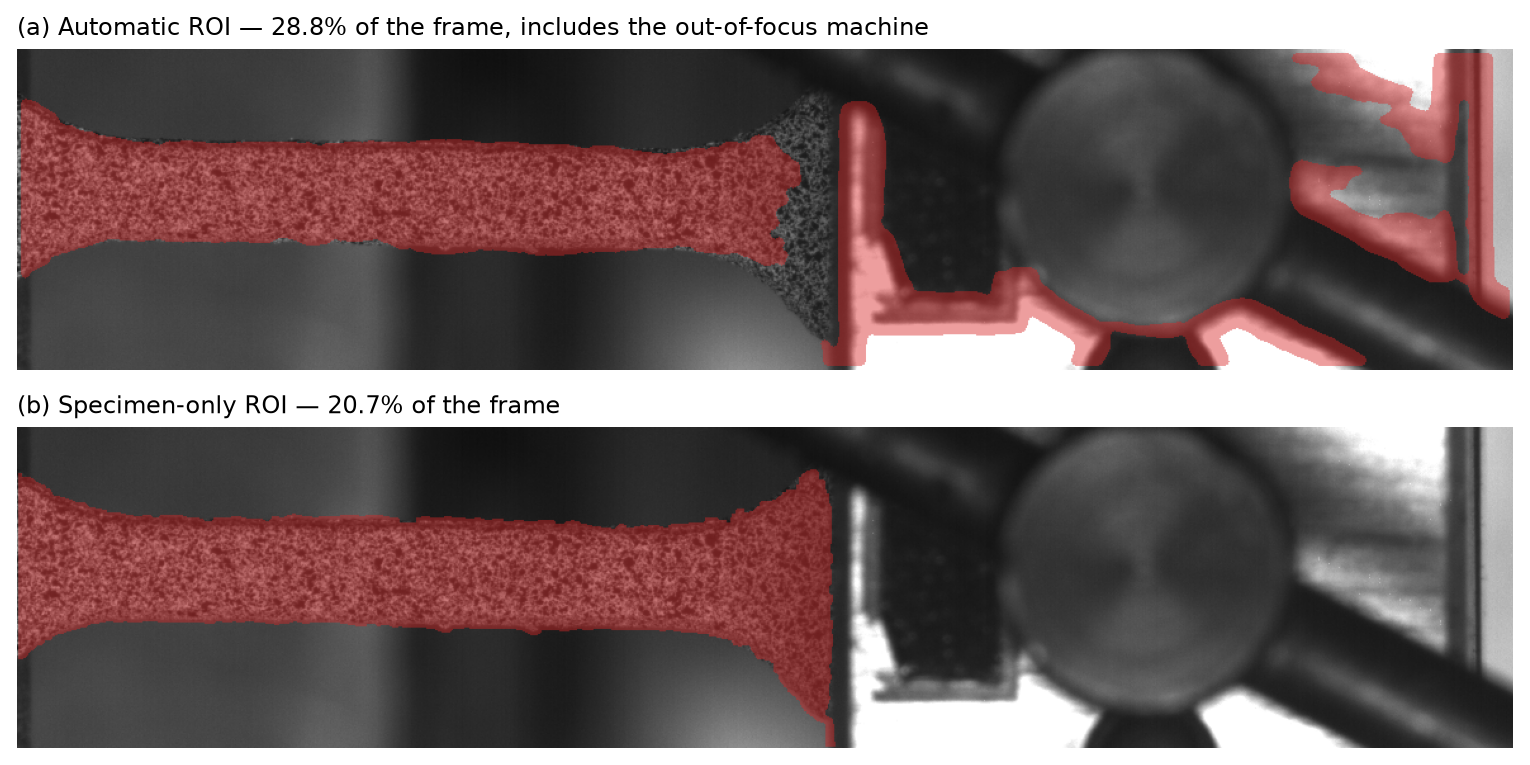
The automatic ROI (top) includes the out-of-focus machine on the right. The specimen-only mask (bottom) is built from fine-scale speckle contrast and keeps just the dog-bone.
The AI agent automatically noticed all these issues, and automatically fixed in two steps: First, a specimen-only mask was generated from the first frame: a 7 × 7 local standard deviation, thresholded at 8 grey levels, cleaned with binary opening/closing, holes filled, largest connected component kept, and everything right of the specimen cut away. Second, the grid was refined to match the specimen:
python -m dic T3_png /tmp/dic2_100 \
  --max-images 100 \
  --mask runs/T3/specimen_mask.png --mask-mode user \
  --subset 21 --step 6 --strain-window 5
The numbers were carefully selected by the AI agent. A 21 px subset fits inside the 76 px strip, and a 6 px step gives enough rows for the 5 × 5 strain window; the resulting virtual strain gauge is 45 px. The agent checked a few alternatives before settling on this one: keeping the 41 px subset gave only 93 strain points per frame at an 8 px step, while a 3-point strain window raised coverage but also raised the strain noise floor.
With the specimen mask, the verification changed completely:
import glob
import numpy as np

bad = [f for f in glob.glob("fields/frame_*.npz")
       if not np.isfinite(np.load(f)["strain_Eeng_xx"]).any()]
print(len(bad), "frames without strain")   # 0
All 100 frames had 681 finite strain points each, 100 % displacement coverage, and 100 strain figures. By frame 100 the mean engineering strain was 0.38 %, with a measured strain noise floor of 0.014 % — small, because the early part of the test is barely moving.
Example 2 — “Run it again using the first 1,000 images”
The next prompt was one sentence:
Can you run it again using the first 1000 images?
Same settings, ten times the frames:
python -m dic T3_png /tmp/dic2_1000 \
  --max-images 1000 \
  --mask runs/T3/specimen_mask.png --mask-mode user \
  --subset 21 --step 6 --strain-window 5
The correlation took 317 s (0.32 s/frame); figure rendering — 2,000 per-frame figures plus the extras and animations — took another 439 s. The output tree is 703 MB. The run reported:
| Quantity | 1,000-frame run |
|---|---|
| Images | T3-00000 … T3-00999, 1,181 × 253 px |
| Grid | 1,203 points; subset 21 px, step 6 px |
| Strain window | 5 × 5 points, VSG 45 px |
| Displacement coverage | 99.75 – 100 % |
| Strain points per frame | 678 – 681 |
Final mean Eeng_xx | 11.09% |
Final mean Eeng_yy | −3.42% (ν ≈ 0.31) |
Final mean Etr_xx | 10.48% |
| Strain noise floor | 0.042% |
| ZNCC median (last frame) | 0.979 |
| Max displacement | 75.7 px |
The agent then verified every frame, not just the last one: 1,000 of 1,000 field files contained finite strain values, 1,000 strain figures existed, and the per-frame time series contained no NaN. That last check is the one that matters. A single contour plot of the final frame can look perfect while 999 other frames are empty.
The third prompt was:
Can you create a figure showing the engineering strain (x-dir) as a function of frame number?
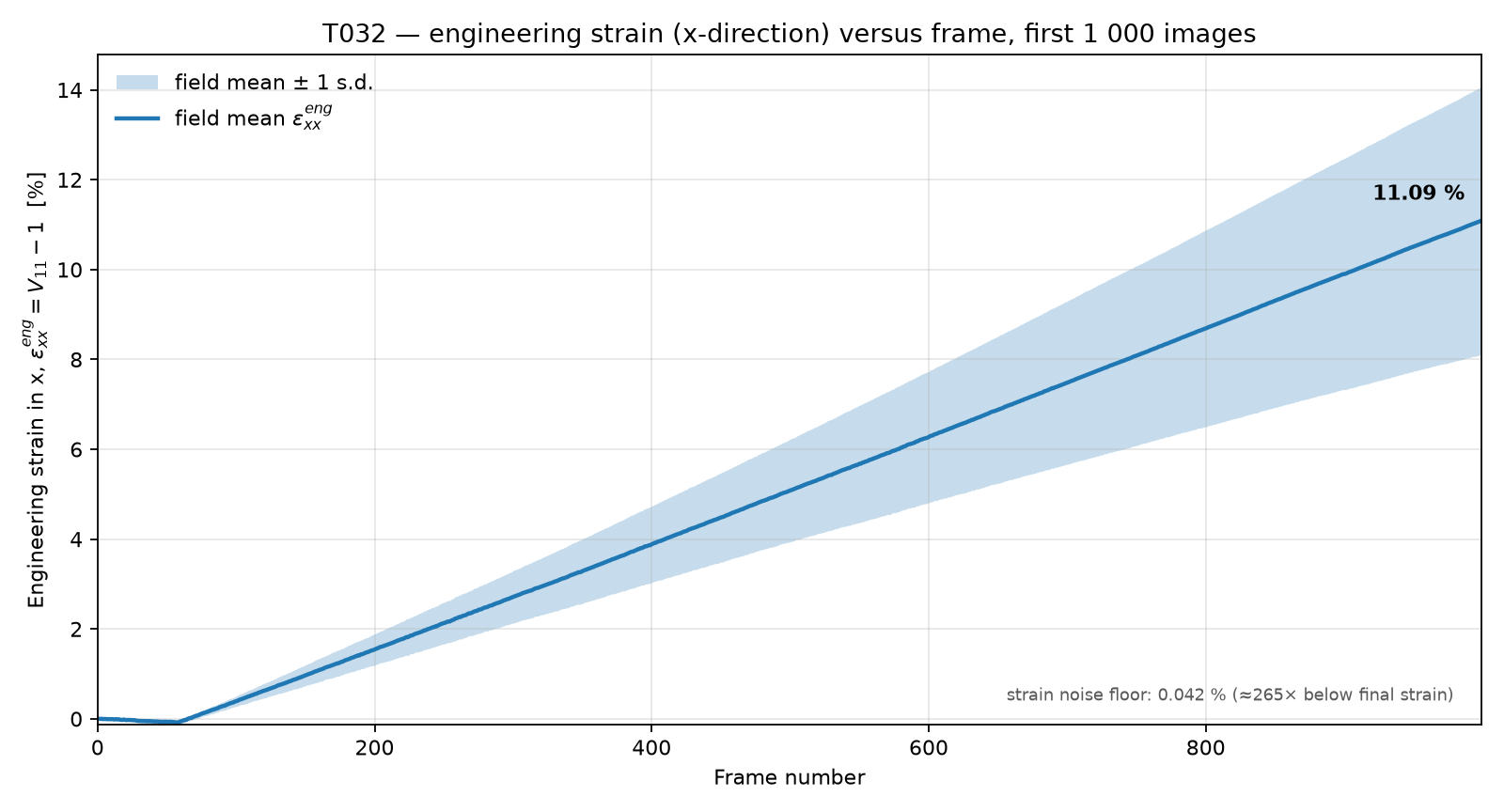
Field-mean engineering strain Eeng_xx for all 1,000 frames. The shaded band is ±1 standard deviation across the field — it reflects the real spatial spread between the grips and the gauge, not measurement noise. The measured strain noise floor is 0.042 %, roughly 265× below the final value.
The result is a remarkably straight line: about 0.011 % strain per frame, reaching 11.09 % at frame 1,000. The transverse strain is −3.42 %, which gives an apparent Poisson ratio of 0.31. The true strain at the same point is 10.48 %, consistent with $\ln(1.1109) = 10.52\%$ (the small difference comes from averaging a non-uniform field). These are exactly the kinds of numbers a human should sanity-check — and they are physically plausible for a uniaxial tensile test.
The corresponding strain field at the last frame shows how the measure behaves at finite deformation:
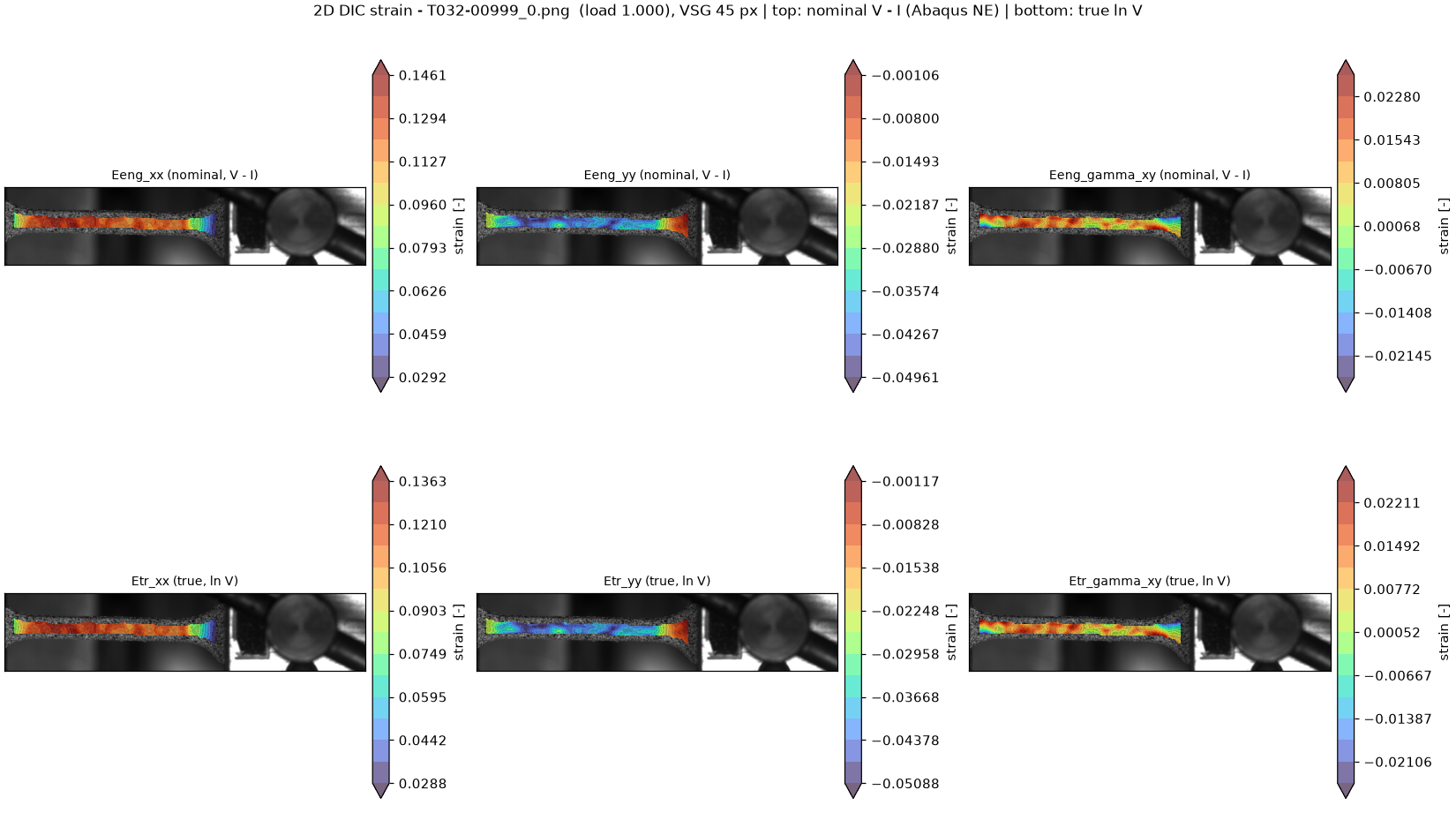
Nominal strain V − I on top, true (logarithmic) strain ln V below, at frame 1,000. The axial strain reaches about 14.6% locally; the transverse strain is negative (contraction) and the shear is small. The field follows the deformed specimen.
What the agent did — and what it did not
The agent’s actions were simple, which is the point:
- Counted the images and translated “first 100” into
--max-images 100. - Ran the CLI and read the log.
- Noticed the
Mean of empty slicewarnings — a symptom a human might scroll past — and checked the actual NPZ arrays instead of trusting the figures. - Inspected the mask and the images, recognized the out-of-focus machine, and diagnosed the five-row grid versus the 5 × 5 strain window.
- Built a specimen-only mask, benchmarked a few subset/step/window combinations, and picked one with a measured noise floor.
- Reran the analysis, then verified every frame rather than a sample.
- Wrote the strain-history plot directly from the per-frame fields.
What it did not do is decide that the experiment was worth running, define the specimen geometry, or judge whether a Poisson ratio of 0.31 is plausible for this material. Those remain my job. The agent also needed to be told to check the strain fields. Without that instruction, the first run would have left a complete-looking output tree with blank strain figures.
That is the broader lesson: an exit code of 0 is not a passing analysis. Silent failures in scientific software are common, and they look exactly like success until you inspect the arrays. An LLM agent is useful here precisely because the checks can be made explicit and mechanical: every frame has finite strain values; every figure exists; the time series has no NaNs; coverage stays above a threshold. The agent ran those checks in seconds, and the log and params.json preserved the provenance.
Reproducing it
The package is at github.com/Jorgen-Bergstrom/Dic-2D, and the full run is:
python -m dic /path/to/T_png /tmp/dic2_1000 \
  --max-images 1000 \
  --mask /path/to/specimen_mask.png --mask-mode user \
  --subset 21 --step 6 --strain-window 5
The mask is an ordinary 8-bit image of the same size as the frames, with 255 marking valid DIC points. It was produced from the reference frame with about fifteen lines of NumPy/SciPy: local standard deviation at the speckle scale, threshold, morphological cleanup, largest connected component, crop to the specimen. Any equivalent ROI works; the important thing is that it contains the speckled material and nothing else.
The T3 image set is from a lab test and is not part of the repository; the package ships with the Data01 dataset and a synthetic generator for its validation suite.
The run writes summary_report.md (settings, coverage, noise floor, accuracy statement), strain_timeseries.csv, one NPZ per frame under fields/, and the figures under figures/ and extras/.
Takeaways
- The solver was never the problem. A validated DIC implementation returned
NaNstrains because the ROI and the strain window did not fit the specimen. Most of the work in a real analysis is setup and verification. - Natural language is a good interface to that work. “Run the first 1,000 and plot the x-strain versus frame” is a complete specification when the agent can run the CLI, read the data, and verify the output.
- Make the checks explicit. “Make sure it calculated the strain fields for every image” turned a plausible-looking run into a caught failure. The same instruction is good practice for a human.
- The physics is still the final check. A linear strain ramp to 11.09%, a transverse contraction of −3.42%, and a Poisson ratio near 0.31 are the kind of sanity checks no agent should skip — and no contour plot should replace.
The prompts in this post are the whole interface. The rest is a command-line program that writes down what it did.