 Jorgen Bergstrom
Calculate Pi Using Python
Background
The purpose of this article is to demonstrate how JupyterLab can be used to solve numerical problems using Python.
My example here is not a machine learning problem, but instead focuses on how one can calculate an approximate value of Pi. You may want to know why you want to do this since you can always just type:
>>> import math
>>> math.pi
3.141592653589793
But did you know that the value returned by math.pi is simply the same as the following ratio:
>>> math.pi.as_integer_ratio()
(884279719003555, 281474976710656)
Therefore:
>>> 884279719003555 / 281474976710656 == math.pi
True
This is of course not right since pi is an irrational number. What is we want to calculate the first, say, 40 digits of pi? How can we do that? Or more generally, what are some methods to calculate approximate values of pi? I will present 5 different methods in this article.

Method 1: Circle and Square
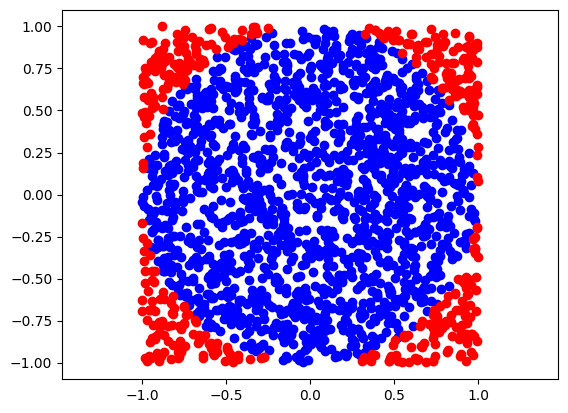
One cool and perhaps surprising way to calculate pi is to generate random locations within a square. Then the ratio between the number of locations that happen to be within the inscribed circle to the total number of locations can be used to approximate the value of pi. If we select the circle to have a radius of 1, then the area of the circle will be pi, and the area of the square is 4. The following Python code shows how to calculate pi using this method:
import math
import random
import numpy as np
import matplotlib.pyplot as plt

N = 2000
inside_circle = 0
xvec = np.zeros(N)
yvec = np.zeros(N)
for i in range(N):
    xvec[i] = random.uniform(-1, 1)
    yvec[i] = random.uniform(-1, 1)
    radius = math.sqrt(xvec[i]**2 + yvec[i]**2)
    if radius < 1:
        inside_circle += 1

rr = np.sqrt(xvec**2 + yvec**2)

plt.scatter(xvec[rr<1], yvec[rr<1], c='b')
plt.scatter(xvec[rr>1], yvec[rr>1], c='r')
plt.axis('equal')

approximate_pi = 4 * inside_circle / N
print(f"N={N} => approximate pi={approximate_pi}")
print(f"Real pi={math.pi}")
The results from running this code is:
N=2000 => approximate pi=3.102
Real pi=3.141592653589793
This method works, but it is obviously very numerically inefficient.
Method 2: Square - Circle - Square
Another method that is based on the same approach is to generate points between the outside square and a square that is inscribed inside the circle. The reason this is slightly more efficient is that both regions have about the same area. Here’s the Python code:
N = 2000
inside_circle = 0
xvec = np.array([])
yvec = np.array([])
while len(xvec) < N:
    x = random.uniform(0, 1)
    y = random.uniform(0, 1)
    if x < 1/math.sqrt(2) and y < 1/math.sqrt(2):
        continue
    xvec = np.append(xvec, x)
    yvec = np.append(yvec, y)
    radius = math.sqrt(x**2 + y**2)
    if radius < 1:
        inside_circle += 1

rr = np.sqrt(xvec**2 + yvec**2)

plt.scatter(xvec[rr<1], yvec[rr<1], c='b')
plt.scatter(xvec[rr>1], yvec[rr>1], c='r')
plt.axis('equal')

R = inside_circle / (N - inside_circle)
approximate_pi = 2 * (2*R+1) / (R+1)
print(f"N={N} => approximate pi={approximate_pi}")
print(f"Real pi={math.pi}")
The results from running this code is:
N=2000 => approximate pi=3.1329999999999996
Real pi=3.141592653589793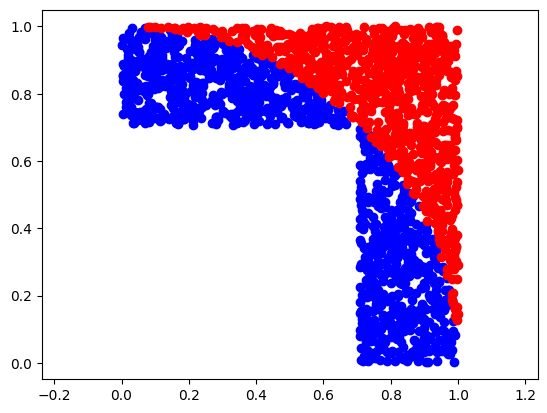
This method also works but is still very inefficient.
Method 3: MacLaurin Series
A completely different approach is to recall that pi can be calculated from $\pi = 4 \arctan(1)$, which can be written
$$ \pi = 4 \left( 1 - \frac{1}{3} + \frac{1}{5} - \frac{1}{7} + \cdots\right).$$
This series can be implemented in Python as follows:
N = 1000
sum = 0
sign = 1
for i in range(1, 2*N, 2):
    sum += sign/i
    sign *= -1

approx_pi = 4 * sum
print(f"N={N} => approximate pi={approx_pi}")
print(f"Real pi={math.pi}")
The results from running this code is:
N=1000 => approximate pi=3.140592653839794
Real pi=3.141592653589793
In other words, this works too, but is still very inefficient (slow).
Method 4: More Advanced Series
A much faster converging approximation of pi was proposed by Srinivasa Ramanujan in 1910. Here is one implementation:
N = 3
sum = 0
for k in range(N):
    sum += math.factorial(4*k) * (1103 + 26390*k) / (math.factorial(k)**4 * 396**(4*k))

approx_pi = 9801 / sum / (math.sqrt(2) * 2)
print(f"N={N} => approximate pi={approx_pi}")
print(f"Real pi={math.pi}")
Note that the first 3 terms in this series give the first 16 digits of Pi. Very cool! I don’t know how Srinivasa derived this equation. I recommend that you read the wikipedia article about him. What a life story.
Method 5: Python Arbitrary Math
If you just want to know pi to some given precision, then you can also use the mpmath library. Here’s one example:
from mpmath import *
mp.dps = 80
mp.pretty = True
print(+pi)
print(4 * atan(1))
The results from running this code is:
3.141592653589793238462643383279502884197169399375105820974944592307816406286209
3.141592653589793238462643383279502884197169399375105820974944592307816406286209
This is an easy Python way to find an arbitrary digits of pi.
Method 6: ChatGPT Solution for High Precision Calculation of Pi
I asked GPT-4o: “Can you write another python program that can calculate the 40 first digits of pi?”. And the answer I got was the following.
import decimal

# Set the precision for the decimal module
decimal.getcontext().prec = 42  # We set it to 42 to ensure we get at least 40 accurate digits

def calculate_pi():
    pi = decimal.Decimal(0)
    k = 0
    while k < 100:
        pi += (decimal.Decimal(1) / decimal.Decimal(16)**k) * (
            decimal.Decimal(4) / (8 * k + 1) -
            decimal.Decimal(2) / (8 * k + 4) -
            decimal.Decimal(1) / (8 * k + 5) -
            decimal.Decimal(1) / (8 * k + 6)
        )
        k += 1
    return pi

# Calculate Pi
pi_value = calculate_pi()

# Print the first 40 digits of Pi
print(f"First 40 digits of Pi: {str(pi_value)[:42]}")

# If you only want the first 40 digits (excluding the '3.'):
print(f"First 40 digits of Pi (excluding '3.'): {str(pi_value)[2:42]}")
This solution is apparently based on the Bailey–Borwein–Plouffe (BBP) formula, and seems to work well in my tests. This is a clear example where a LLM like GPT-4o is really interesting. This approach is very short and clean. Nicely done!